Games · Graphics
How Apex Isle looks good on a laptop: a temporal upscaler, wet-road reflections and honest naming
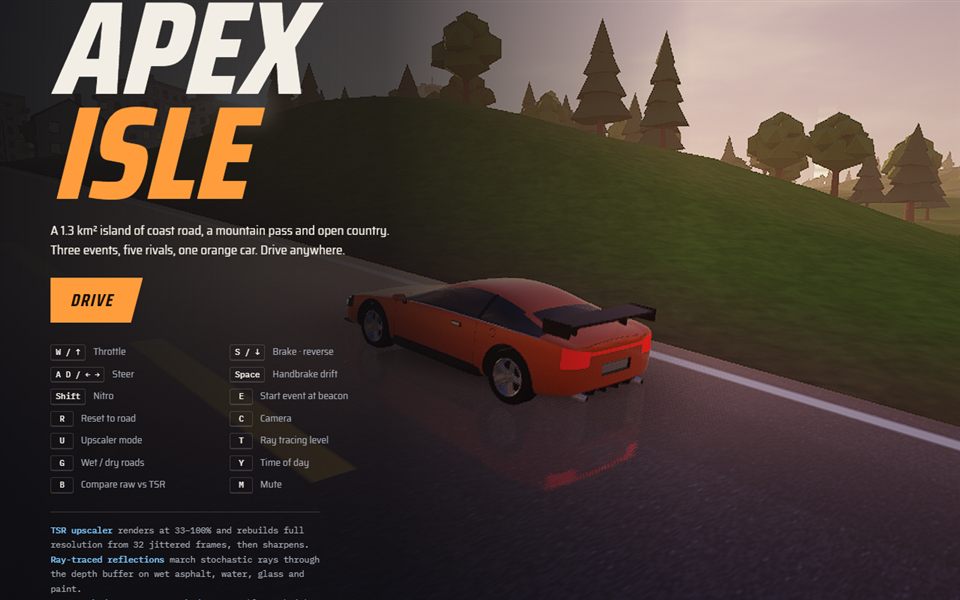
Apex Isle is a 1.3 km² island with coast road, a mountain pass and open country that you can drive anywhere on – straight in the browser, from a single HTML file, with three.js underneath and no engine. The racing is deliberately simple: three events, five rivals, one orange car. The interesting part is making it look good on an ordinary laptop.
Render less, reconstruct more
The biggest win is a temporal upscaler in the spirit of TSR. The scene is rendered at somewhere between 33 % and 100 % of screen resolution. Every frame the camera is nudged by a sub-pixel offset (jitter), and the upscaler rebuilds full resolution from the last 32 jittered frames, then sharpens the result.
Why it matters: at 50 % resolution you shade a quarter of the pixels. On integrated graphics that is the difference between smooth and choppy. The cost is ghosting on fast motion, which you fight by rejecting history samples that no longer match the current frame.
// the idea, per frame
jitter = halton(frameIndex % 32) - 0.5;          // sub-pixel offset
camera.setViewOffset(w, h, jitter.x, jitter.y, w, h);
render(sceneAtLowRes);
history = mix(reproject(history), current, 1/32); // accumulate
output  = sharpen(history);
In the game, press B to compare the raw low-resolution render with the reconstructed output.
Wet roads need reflections
Golden-hour light on a dry road looks flat. On a wet road it looks like a racing game. Apex Isle uses screen-space reflections: for every reflective pixel, rays are marched through the depth buffer to find what they hit, with a bit of randomness (stochastic rays) so rough surfaces like asphalt get blurry reflections and glass gets sharp ones.
Two honest limitations: screen-space reflections can only show what is already on screen, and stochastic rays are noisy. The second one solves itself – the temporal upscaler is already averaging 32 frames, so the noise melts away for free. Temporal techniques compound.
Making the car sit on the road
- Ray-marched ambient occlusion darkens creases and the area under the car.
- Contact shadows – short screen-space rays toward the sun – catch the small shadows that shadow maps miss, so wheels touch the asphalt instead of hovering.
- HDR + bloom + ACES tone mapping let the sun and headlights be properly bright without washing out the rest.
- Height fog gives the mountain pass depth and hides where detail ends.
Every effect has a switch
Ray tracing quality, road surface (dry / wet), time of day, upscaler quality – all toggle live with a key (T, G, Y, U). It works like a debugging panel for players: the quickest way for anyone to see what each effect actually does to the image and the frame time.
Lessons
- Measure on the weakest machine you care about. That is what makes an upscaler worth the effort.
- Accumulate over time. Once you keep a history buffer, every noisy effect gets cleaner without extra samples.
- Name things honestly. "Ray-traced" sells, but these are screen-space ray-marched reflections – say so, technical players will check.
- A single HTML file is a feature. Nothing to install, nothing to break, and it uploads anywhere – including itch.io.
Try it: play Apex Isle free – and if it runs badly on your machine, write to hi@ehog.io with your GPU and FPS.
Written by Rukas Waves – music producer from Lithuania who builds free browser games on the side. Questions or corrections: hi@ehog.io.